


Lewiston GMC – What Does ProGrade Trailering Include on the 2026 GMC Sierra 2500 HD for Coeur d’Alene, ID Drivers?
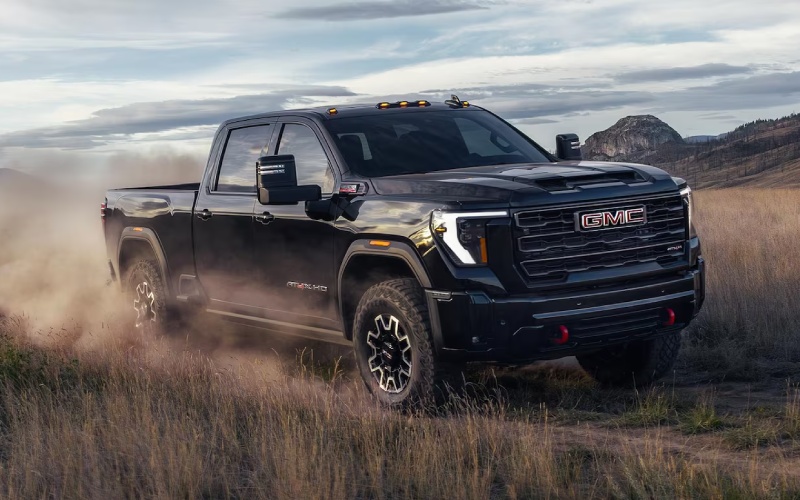
ProGrade® Trailering on the 2026 GMC Sierra 2500 HD is built to reduce the friction points of towing—setup, verification, and real-time monitoring—so you can focus on the road and your destination. If you regularly back a camper into tight campgrounds around Lake Coeur d’Alene or guide a cargo trailer through downtown streets, the right blend of camera views, checklists, and in-cab tools can be the difference between guesswork and calm, repeatable precision.
This guide breaks down what ProGrade® Trailering is, what the In-Vehicle Trailering App does, and how tools like HD Surround Vision and Transparent Trailer View help you stay in command. You’ll also find practical tips to set up profiles for multiple trailers and discover how the available Duramax® 6.6L Turbo-Diesel V8 pairs with trailering tech to inspire confidence on long grades and winding byways.
What ProGrade® Trailering Includes
GMC’s ProGrade® Trailering System is an available suite designed to make towing easier from the first connection to the final parking maneuver. It’s centered around the In-Vehicle Trailering App that lives on the Sierra HD’s available 13.4-inch diagonal center display, delivering a control hub for profiles, checklists, and diagnostics in one place. The system integrates with available camera views—up to 14 in total—to support informative visuals when you need them most.
Here’s how the core elements come together on the 2026 GMC Sierra 2500 HD to support you before, during, and after every tow.
- Trailer profiles: Create and save settings for each trailer—bumper-pull, gooseneck, or fifth-wheel—so the truck recalls your preferences and maintenance history.
- Pre-departure checklists: Use on-screen steps to verify key tasks like coupler locks, safety chains, breakaway cable, and lighting—especially helpful when towing solo.
- Lighting test: Cycle trailer lights using the app while you walk around, ensuring brake, turn, and running lights are working without extra help.
- Maintenance tracking: Record tire sizes, mileage, and service notes so you can monitor wear items and schedule service proactively.
- On-road diagnostics: View trailer tire pressure/temperature and gain quick access to camera views to keep tabs on your load while rolling.
Because everything is integrated into the truck’s native interface, the experience is cohesive and quick to learn. After a few uses, most drivers can run through setup tasks in minutes.
Camera Views That Change the Game
ProGrade® Trailering is amplified by available HD Surround Vision and up to 14 camera views. These visuals are your second set of eyes when lining up, backing down a narrow drive, or navigating a crowded boat launch. For drivers making regular trips across the Palouse or around resorts near the lake, the ability to swap angles instantly can reduce stress and save time.
- Hitch view: Zooms in on the hitch ball or fifth-wheel plate to align precisely without repeated in-and-out adjustments.
- Bed view: Keeps the gooseneck or fifth-wheel pin in sight for a clean, confident coupling—especially helpful in crosswinds.
- Transparent Trailer View: Allows you to virtually “see through” a compatible, properly equipped trailer, so you can monitor vehicles and obstacles behind you.
- Surround view: Creates a composite overhead image to visualize curbs, posts, and tight angles in lots or campgrounds.
- Side and rear trailer views: Watch lanes and cargo while changing lanes or checking tie-downs mid-trip.
Practice toggling between views in a quiet lot. Once the muscle memory sets in, you’ll feel the difference when you face real-world challenges like angled driveways or busy fuel stations.
How the In-Vehicle Trailering App Streamlines Your Day
The In-Vehicle Trailering App isn’t just a checklist—it’s a routine you can count on. Set up a trailer profile with vitals like weight class, tire info, and service dates. Before departure, run the lighting test and pre-departure list in minutes. Once moving, check tire pressures or switch to the camera you need without digging through menus. If your weekends alternate between a camper and a utility trailer, saving profiles means fewer errors and faster turnarounds.
Pair this with available Adaptive Cruise Control with trailering to help maintain following gaps when towing, and you have a system designed to smooth out long drives on two-lane highways and interstates alike.
Diesel Power Meets Trailering Tech
For frequent towing, the available Duramax® 6.6L Turbo-Diesel V8 complements the trailering suite with relaxed torque and predictable braking feel when descending grades. If you’re hauling a larger camper from the Spokane River Valley into higher elevations, the diesel’s low-end pull and integrated aids can help you keep speeds steady while reducing downshifts. On the flip side, the standard 6.6L gas V8 is a rock-solid match for moderate loads and mixed daily use, so it’s worth choosing based on how often—and how heavy—you tow.
Quick Setup Tips for First-Time Users
Getting the most from ProGrade® Trailering takes just a little prep. A short dry run at home or in a lot pays off the first time you connect on a busy morning or in fading light.
- Build your profiles: Enter each trailer’s details, including tire specs, and save them with clear names like “Camper” or “Equipment.”
- Practice the checklist: Run the lighting test and pre-departure list without time pressure so you know the flow.
- Explore views: Try hitch, bed, side, and Transparent Trailer View in a lot to learn when each helps most.
- Test with weight: Load moderate cargo and drive a short loop to feel braking and stability before a big trip.
- Review settings: Confirm your trailer brake gain and any alerts in the app before hitting the highway.
These steps turn the Sierra HD’s tools into habits—which is where confidence really comes from.
FAQ Spotlight: Do I Need All the Camera Views?
Not everyone needs the full array, but many drivers quickly come to rely on them. If you back into tight spaces often, HD Surround Vision and hitch/bed views are almost indispensable. If you tow a longer camper or cargo trailer, Transparent Trailer View can make lane changes and merges feel more natural. And for owners who swap trailers, the combination of profiles and cameras eliminates a lot of guesswork.
If you’re building your truck at home and weighing options, think about your most common challenges: busy campgrounds, angled residential driveways, or narrow job sites. Then pick the views that address those pain points first; you can always add compatible accessory camera options later.
Local Support You Can Count On
When you’re ready to try ProGrade® Trailering on local roads, schedule a test drive with a route that includes a few tight turns and a practice back-in. Our team at Lewiston GMC can walk you through the camera views, set up a trailer profile with you, and show how the In-Vehicle Trailering App becomes second nature after a couple of trips. We’re proudly serving Coeur d’Alene, Liberty Lake, and Clarkston with guidance that’s tailored to your roads, your trailers, and your weekend plans.
Whether you’re a seasoned tower or just getting started, the 2026 GMC Sierra 2500 HD’s available trailering technologies bring clarity to every step. With the right configuration and a quick orientation, you’ll head out knowing your truck is set up to help you do the job well—every time.
Request more 2026 GMC Sierra 2500 HD information
Connect with us

